

If you’re managing your own WordPress website, you’ve probably wondered which page builder will make your life easier. With so many options available, choosing the right one can feel overwhelming. This WordPress Page Builder Comparison guide compares four popular builders, Elementor, Divi, Beaver Builder, and Gutenberg, to help you make an informed decision based on licensing costs, usability, and support.
Table of Contents
Understanding WordPress Page Builders
WordPress page builders let you create and customize web pages using a visual, drag-and-drop interface instead of writing code. For small business owners, this means you can build professional-looking pages without hiring a developer for every change.
Each builder has its own approach to design, different pricing models, and varying levels of community support. Let’s examine what makes each one unique.
At Veracity Technologies, we use different WordPress builders depending on the use case. This includes implementations with Gutenberg, Elementor Pro, Divi, and Beaver Builder.
Gutenberg: The Built-In Option
Cost: Free (included with WordPress)
Gutenberg is WordPress’s native block editor, introduced in 2018. It’s already installed on your WordPress site, requiring no additional plugins or purchases.
Usability
Gutenberg uses a “block” system where each element (paragraph, image, button) is a separate block you can move around. The interface is clean and straightforward, making it approachable for beginners. However, design customization is more limited compared to third-party builders.
The learning curve is gentle because Gutenberg follows WordPress’s overall design philosophy. You won’t find flashy animations or complex layout options, but you can create solid, functional pages.
Support
Since Gutenberg is part of WordPress core, you’ll find extensive documentation on WordPress.org. The WordPress community forums are active, and many tutorials exist online. However, official support is community-based rather than direct customer service.
Elementor: The Popular Choice
Cost: Free version available; Elementor Pro starts at $59/year for 1 site, $99/year for three sites, $199/year for 25 sites
Elementor is currently the most widely used WordPress page builder, powering millions of websites worldwide.
Usability
Elementor’s visual editor shows you precisely what your page will look like as you build it. The drag-and-drop interface is intuitive, with widgets for common elements: text, images, buttons, forms, and more.
The free version includes 40+ widgets and 30+ templates, which is plenty for basic websites. Elementor Pro adds 90+ widgets, 300+ templates, theme-building capabilities, and pop-up functionality. For beginners, the abundance of pre-designed templates makes professional results achievable without design experience.
One standout feature: Elementor’s responsive editing lets you adjust how your page looks on desktop, tablet, and mobile devices separately.
Support
Elementor Pro users get access to premium support with response times typically within 24 hours. The free version relies on community forums. Elementor maintains extensive documentation, video tutorials, and an active Facebook community where users share tips and templates.
Divi: The All-In-One Solution
Cost: $89/year for unlimited sites, or a $249 one-time payment for lifetime access
Divi, created by Elegant Themes, bundles a page builder with a complete WordPress theme. Your subscription also includes access to all Elegant Themes plugins and hundreds of pre-made layouts.
Usability
Divi offers two editing modes: a visual builder for the front end and a backend builder for the WordPress dashboard. This flexibility lets you choose the editing style that feels most comfortable.
The builder uses a hierarchical structure of sections, rows, and modules. While this adds some complexity initially, it provides precise control over your layouts. Divi includes 46 content modules and over 200 elements.
Exciting Development: Divi 5 is launching soon with a completely rebuilt visual editor, improved performance, and a more modern workflow. Early previews suggest significant improvements to the user experience, making it even more beginner-friendly.
Support
Your Divi subscription includes premium support and access to an extensive knowledge base. Elegant Themes maintains active forums, and the large Divi community produces countless third-party tutorials, child themes, and extensions. The lifetime access option is desirable for long-term planning.
Beaver Builder: The Reliable Performer
Cost: Free version available; Premium starts at $99/year for unlimited sites, $199/year adds white-labeling and multisite support
Beaver Builder has earned a reputation for clean code and reliability, making it popular among developers and agencies who value stability.
Usability
Beaver Builder’s interface is straightforward and uncluttered. It uses a modular approach with content modules, rows, and columns. The drag-and-drop system is smooth and predictable, though it may feel less modern than Elementor’s interface.
The free Beaver Builder Lite version includes basic modules and is genuinely useful for simple sites. The premium version unlocks advanced modules, templates, and the Theme Builder for creating custom headers, footers, and layouts.
What sets Beaver Builder apart is its focus on creating clean HTML and CSS that won’t slow down your website. For beginners who care about site speed, this is valuable.
Support
Premium Beaver Builder users receive support through a ticketing system and access to comprehensive documentation. The community is smaller than Elementor or Divi, but highly engaged. Many WordPress professionals use and recommend Beaver Builder, so quality resources are readily available.
WordPress Page Builder Comparison Summary
Best for Beginners
Gutenberg offers the gentlest learning curve but limited design flexibility. Elementor combines ease of use with powerful features and has the most templates. Divi provides excellent value with unlimited site licenses and comprehensive design tools. Beaver Builder delivers simplicity with solid performance.
Support Quality
Divi offers the most comprehensive package with lifetime access options. Elementor Pro provides responsive premium support. Beaver Builder delivers reliable support for premium users. Gutenberg relies on community support.
Quick Comparison Table
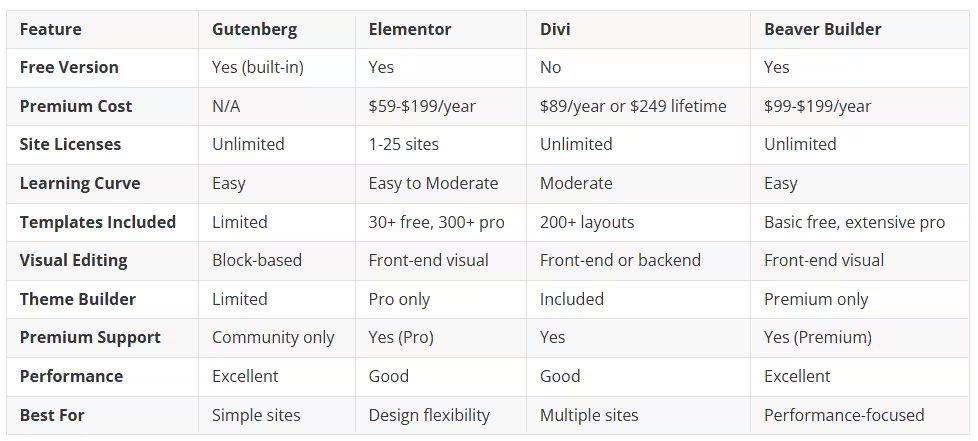
Which Builder Is Right for You?
Choose Gutenberg if: You’re starting, have simple page needs, and want to avoid additional costs. It’s perfect for basic blogs and informational sites.
Choose Elementor if: You want extensive design options, need lots of templates, and prefer a large community. The free version is excellent for testing, and Pro pricing is reasonable for growing businesses.
Choose Divi if: You manage multiple sites (the unlimited license is an unbeatable value), want both a theme and builder in one package, and appreciate having lifetime access as an option. Watch for the release of Divi 5 for the latest improvements.
Choose Beaver Builder if: You prioritize site performance and clean code, want reliable software that won’t break during WordPress updates, and prefer a no-frills interface.
For most small business owners new to WordPress, Elementor or Gutenberg are the best starting points. Elementor’s free version lets you test advanced features before committing financially, while Gutenberg requires zero additional setup. As your skills grow, you can upgrade or switch builders. WordPress enables migration between builders, though it requires some effort.
Remember that any of these builders can create professional websites in the right hands. The best choice depends on your specific needs, budget, and how much time you want to invest in learning the tool.
If you need assistance choosing or setting up a page builder for your WordPress site, please get in touch with us. We’ve worked with all these builders extensively and can help you make the right choice for your business.